Realme RMX2071 Claims to Have the Highest Score in Antutu History

Realme RMX2071 Claims to Have the Highest Score in Antutu History


Realme has prepared its new product with the code RMX2071. Reportedly this smartphone will bring wild and high performance. Even the device performance comparison platform, Antutu Benchmark, leaked the results of the new Realme test.

Impressively, this smartphone gets the highest score ever in the history of the popular AnTuTu Benchmark app, with scores reaching more than 570,000 points. With the highest score, the realme of RMX2071 surpassed the previous highest score, which is 560,217 achieved by other smartphone brands that also use the same processor, it looks like an ASUS ROG phone.

The screenshots of the leaked AnTuTu Benchmark show that the realme of the RMX2071 uses the latest Qualcomm SM8250 (Snapdragon 865) mobile platform which is also equipped with 5G connectivity and Adreno 650 GPU GPU.

Snapdragon 865 itself will bring 5G connectivity and lead the 5th generation AI with breakthrough features, from gigapixel-speed photography to desktop-level gaming features to stunning 5G multi-gigabit connectivity.

Snapdragon 865 is the most advanced 5G platform ever from Qualcomm, helping smart phone brands take advantage of the 5G connectivity range.

With the screenshots leaked from AnTuTu Benchmark, it's not impossible that the reality will launch this product in the near future. the realme of the RMX2071 is predicted to be launched at the Mobile World Congress as a flagship product from the realme in early 2020.


Billie Eilish Apologizes to Win the Song of the Year Grammy Awards 2020

Grammy Awards Red Carpet Fashion  -  Billie Eilish


Young singer Billie Eilish won the Song of the Year category at the 62nd 2020 Grammy Awards for her single "Bad Guy".

He received the award with his brother and producer, Finneas O'Connell.

"So many other songs that deserve this award. I'm sorry," Eilish said opening his remarks, as reported by The Hollywood Reporter, Monday (1/27/2020).

Eilish claimed he had never imagined this in his life and was grateful for the first Grammy award.

After that, he also introduced his brother whom he called a friend.

"I feel good about joking and never take things like this seriously, but I really want to thank you. I feel very honored to be among all of you," Eilish said.

He then invited his brother to speak.

"This is really a big problem. I never thought we would win this," O'Connell said.

O'Connell said, he was with his brother so far often making songs together in the bedroom.

Until now, they still do the same thing.

"(The award) is for all the children who make music in their rooms today. You will get one of them," O'Connell said.

Eilish defeated Lady Gaga with "Always Remember Us This Way", Ask Tucker "Bring My Flowers Now", HER with "Hard Place", Taylor Swift with "Lover", Lana del Rey "Norman F *** ing Rockwell", Lewis Capaldi "Someone You Loved", and Lizzo "Truth Hurts"

The 18-year-old singer received the second most nominations along with Lil Nas X with six nominations.

Eilish is the youngest winner in this category since Lorde, who was only 17 when he won an award in 2013 for writing with "Royals".

The 62nd Grammy Awards 2020 event was held at the Staples Center, Los Angeles, Sunday (1/26/2020) local time.


Screenshot on the Samsung Galaxy S5


Want to take a screenshot on your Galaxy S5 or Galaxy S5 Active? It's just a couple buttons - or a swipe - away

This Galaxy S5 trick is an old one, but a good one. And it's one you'll certainly want to use. For those of you who are coming to the Samsung Galaxy S5 from another Samsung Galaxy phone, you'll be right at home here. Taking a screenshot on the Galaxy S5 is exactly the same.

But for those of you who are coming over from an iPhone or another Android phone, it's a slightly different procedure. And Samsung's got one really cool trick up its sleeve. (Note that these methods also work on the more rugged Galaxy S5 Active.)

Method 1


Probably the easiest way to take a screenshot on the Galaxy S5 is to just use the physical button combination. And it's actually the same method as with the iPhone — it's just that the buttons are in different locations. Here's how to do it:

  1. Get the screen that you want to capture ready to go.
  2. Simultaneously press the power button and the home button. It can be a bit of a stretch on these larger phones, but it works. You'll hear the camera shutter sound fire off, and that's how you know you're good to go.
  3. You'll now be able to see the screenshot in the Gallery app, or in Samsung's built-in "My Files" file browser.
  4. If you need to find the screenshots from a command line or through the Android File Transfer tool, they'll be in /pictures/screenshots.

Method 2


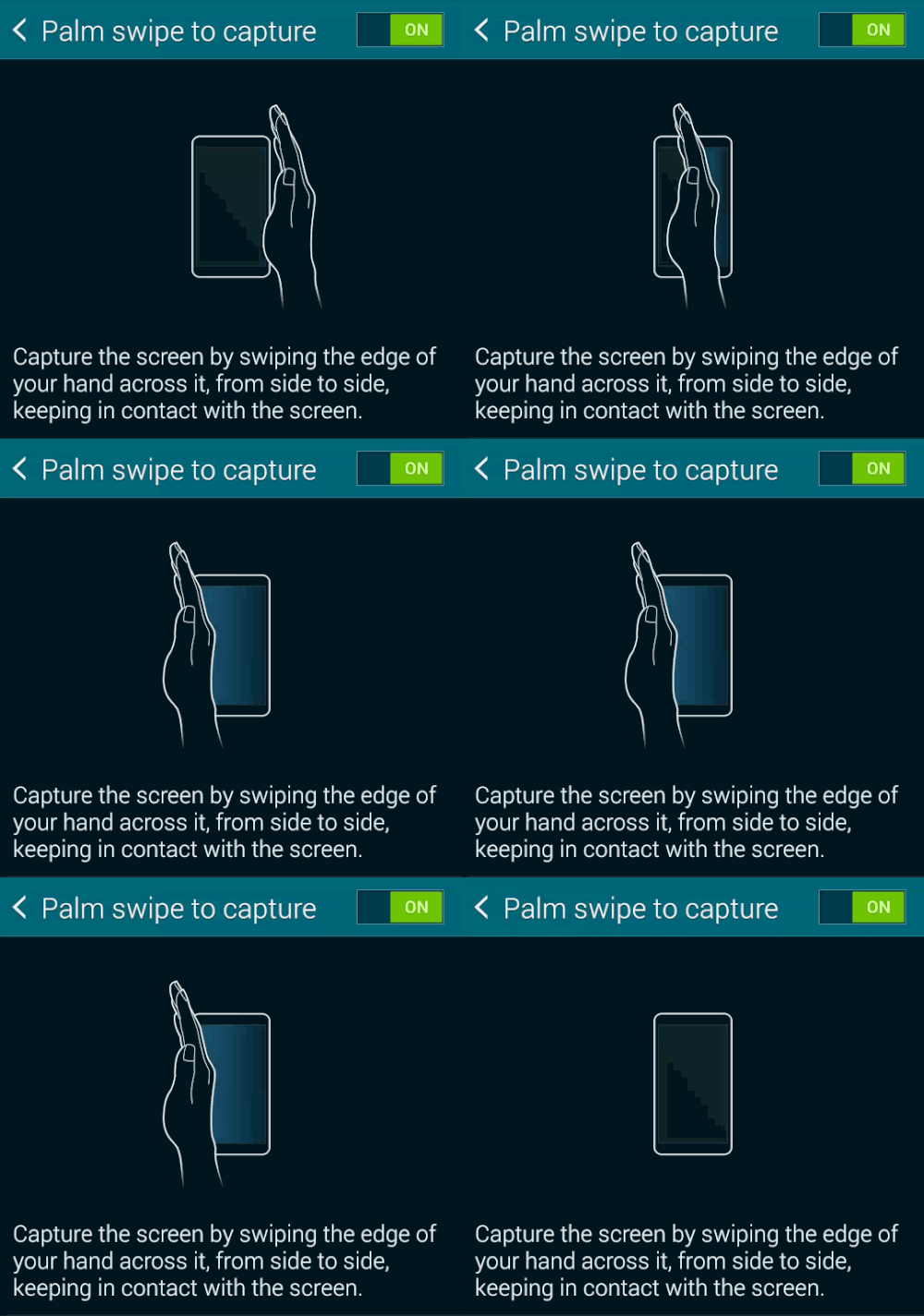
Now this one's cool. And it's not new to Samsung, but it's still pretty neat, and it's enabled by default. Tilt your hand up onto its side, with your pinky facing down. Now swipe it across the screen, and make sure you actually touch the screen.

Boom. Galaxy S5 screenshot. How cool is that?

If you don't want to have this feature enabled or find that you're taking screen shots accidentally, here's how to turn it off:

  1. Go into the settings menu.
  2. Scroll down to "Motion" and choose "Motions and gestures."
  3. Tap "Palm swipe to capture."
  4. Hit the toggle button from on to off.


Enable Samsung Galaxy S5 developer options


Developer mode is easy to get to, you just have to remember to enable it

As has been the case since Android 4.2, the developer options have been hidden by default from your Android settings menu. This is a good thing, actually, as it'll keep curious minds from potentially breaking things. It also helps keep your phone more secure.

But there are plenty of reasons why you would want to enable developer options on your Galaxy S5. If you want to plug in to a computer and do any sort of command-line work, this is going to be your first stop. Or if you need some extra debugging options as a programmer. Or, maybe you are that sort of curious creature who just wants to see how things work. Nothing wrong with any of that.

But, of course, you're going to first have to turn developer mode on for your Galaxy S5. Here's how to do it.

Go to the settings menu on your GS5.
Scroll down to the "System section and tap "About Device."
Now scroll down to "Build number."
Tap the "Build number" section seven times. (You'll see a warning that you're about to unlock developer options.)
Now back out to the main settings menu, and you'll see "Developer options" listed.
From there, you can enable any number of Galaxy S5 developer options at one time. We usually start with USB debugging. If you ever want to turn off developer options wholesale, there's a toggle at the top of the section. This won't hide the options from prying eyes, however. But it'll keep you from accidentally enabling any of the options.


Video Conference Android


Top 3 Ways to do Video Conference On Android

Mobile video chat is additional of a sensible reality nowadays than ever before, currently that almost about each new device sports a front-facing camera and a blisteringly quick net affiliation. therefore if you would like to undertake out face-to-face voice communication with friends or co-workers placed elsewhere within the world, what is the best way? once examining six fashionable video chat apps running on humanoid OS, here's our withstand which of them work well and which of them you'd higher leave on the shelf.

Skype The apps we're watching here embody Skype, Fring, ooVoo, Tango, Qik and Paltalk, All of those apps area unit obtainable across across multiple mobile and/or desktop platforms. For the needs of this text, though, we tend to tested the humanoid OS app on one or two of humanoid devices: specifically, a Samsung layer smartphone and - aside from Qik - a Motorola XOOM pill. (As you will see below, Qik does not support the XOOM.)

Skype
Skype hardly appears to want any introduction here, since it's one among the foremost known and wide used communications apps on the web. additionally to video chat, voice chat, and instant electronic communication (IM), Skype supports VoIP career to outside numbers beginning at two.3 cents per minute. therefore it's fairly comprehensive.

With virtually 700 million registered users, and consumer computer code for each major package, Skype is additionally in theory the foremost broadly speaking compatible of the video chat choices out there. Its touted compability does not stop at OSes. Skype is rated to figure with each humanoid device listed on my Google Play / Android Market account, as well as review units still listed there that i am unable to delete. Here area unit some examples: the Samsung Galaxy Player five, HTC Status, and Viewsonic G-Tablet.

I can't speak to Skype's actual video chat performance across all supported platforms, however it behaved cleanly on my layer phone and XOOM pill. I additionally found the humanoid app quite straightforward to use.
Fring of course, no app or service is while not some negatives. Ironically, one among Skype's is its own omnipresence. once you begin a brand new account, you may notice it troublesome to come back up with a novel username, even though you are simply trying to use your own real name.

Fring
Next up is Fring, that tries to be a low-rent version of Skype. very like its rival, Fring additionally will video chat, IM, voice calls, and VoIP to outside numbers. However, Fring manner undercuts Skype on prices, giving rates of simply one.1 cents per minute on calls to the U.S., but 1/2 Skype's value.

Beyond that, Fring is one among the few video chat apps obtainable for Nokia's previous Symbian-based phones. not like Skype, though, Fring may be a strictly mobile scene with no desktop/laptop computer consumer, which means that the majority folks will not be ready to use the service across all of their devices.

Although Fring will attempt, and it succeeds in some ways in which, it's command back by a interface that is but spectacular. several of the choices ought to be accessed through the Settings menu. Moreover, most of the app's VoIP choices are literally simply a link to a page on the Fring information processing system, forcing awkward navigation for accomplishing tasks like adding credit or searching for per minute rates.

If you ne'er required to manage your minutes - and you ne'er required to use the service once you are not on the go - Fring would be additional viable. however since folks ought to do this stuff, the corporate would be more happy golf stroke to a small degree additional work into its computer code before going toe-to-toe with Skype.

ooVoo
Despite its oddly punctuated name, ooVoo acquits itself quite well because the next best various to Skype. The service is obtainable for all major platforms - as well as Microsoft Windows PCs, Android, and Apple's OS X and iOS - and it offers principally constant options as Skype. In alternative words, text electronic communication, voice calls, video calls, and VoIP area unit all there.

The ooVoo service does not provide career to as several countries as Skype will, however its VoIP rates for those it will cowl area unit pretty low, running at one.8 cents a second to the U.S. and Canada, as an example.

One of ooVoo's real commerce points, however, is its cluster video career choice. whereas Skype offers this solely with premium service, at rates of $10 monthly or $60 yearly, ooVoo provides cluster video for up to 6 folks freed from charge.

(Of course, ooVoo additionally has its own premium service, however upselling is usually the name of the sport.)

Facebook Willing To Buy WhatsApp

Facebook Willing To Buy WhatsApp For $16 Billion


I came across this article online and decided to share, it shows how much money can be made just by simple commitment and continuity.
Read the report by Reuters below:
Facebook Inc will buy fast-growing mobile-messaging startup WhatsApp for $16 billion in cash and stock, as the world’s largest social network looks for ways to boost its popularity, especially among a younger crowd.

Facebook said on Wednesday it will pay $4 billion in cash and about $12 billion in stock in its single largest acquisition, dwarfing the $1 billion it paid for photo-sharing app Instagram.

Shares in Facebook slid 5 percent to $64.70 after hours, from a close of $68.06 on the Nasdaq.
As part of the deal, WhatsApp co-founder and Chief Executive Jan Koum will join Facebook’s board, and the social network will grant an additional $3 billion worth of restricted stock units to WhatsApp’s founders, including Koum.

Also, Facebook promised to keep the WhatsApp brand and service, and pledged a $1 billion cash break-up fee were the deal to fall through.
Facebook was advised by Allen & Co, while WhatApp has enlisted Morgan Stanley for the deal.

what happens, when Nokia introduces Android?


It has a been a big possible rumour that nokia is going to introduce it's first android smartphone. If it is true and legitimate,history is going to break once again. Nokia is already specialised for better backup, battery life, userfriendly, bluetooth and wifi capablity that anuother competitors including samsung, sony, iphone. The external memory supporting and macrosim stability will make it easy and free. If the announcement is officially verified,sure the smart series of samsung is gonna loss a bit lot. All the publishers and producers will compete for nokia. It was quite easily seen when nokia introduced asha series. We can hope for Nokia-Android phones. And it is being called as 'NORMANDY' phones.

Indian First Blogger

Now blogging is became a full time job for all the bloggers, but you need to known the indian first blogger .
Amit Agarwal holds an Engineering degree in Computer Science from I.I.T. and has previously worked at ADP Inc. for clients like Goldman Sachs and Merrill Lynch. In 2004,Amit quit his job to become India’s first and only Professional Blogger.


Amit authors the hugely popular and award-winning Digital Inspiration blog where he write's how to guides around computer software, consumer gadgets, and web apps. He has also written columns on personal technology for major publications including The Wall Street Journal India, The Financial Express, Outlook Magazine, CNN IBN, CNBC TV18 and The Hindustan Times.
Amit has appeared on various TV channels and radio shows including CNN IBN, BBC Radio, CNBC, NDTV, and more. HT mentions Amit as the founder of the Indian blogging revolution, The Economic Times calls.

Amit is the author of The Most Useful Websites, an ebook that discusses the lesser-known but incredibly useful sites on the web.

him as an out-of-the-box thinker while the prestigious Straits Times of Singapore included Amit in their list of Asia’s Blog Stars alongside Chinese actress Xu Jinglei (see press mentions).
Amit is a regular speaker at technology and blogging conferences. Microsoft awarded him the Most Valuable Professional award for five years in a row (2007-2011).
In 2010, Amit launched India Blog School, a non-profit initiative that aims to spread blogging culture in India. He is the curator of India Blogs, a directory of Indian bloggers.
Some of his other tech projects include Sleeping Time, Hundred Zeros, Podcast Gallery, Tall Tweets,RSS Search, HTML Mail, Online Dictation and the AdSense Sandbox.